
Imagine a paralegal at a 15-person law firm juggling dozens of case tasks, deadlines looming, and information scattered across email threads and spreadsheets. It’s a recipe for chaos. As one paralegal bluntly put it, “We are 3 attorneys and 2 paralegals. It’s chaos.” This kind of workflow chaos leads to burnout, mistakes, and constant stress over missing something important. In a litigation-heavy practice, the chaos usually has a predictable shape: discovery deadlines stacking up, draft motions stuck “with the attorney,” deposition scheduling ping-ponging across email threads, and follow-ups that live in someone’s inbox until they become emergencies. None of this is because the team isn’t trying. It’s because the work is invisible until it’s urgent and when work turns urgent, it turns into overtime.
The good news is that the right case management tools and project management techniques, used together, can bring order to the madness. In this guide, we’ll break down the differences between case management and project management for law firms, and how combining them can help reduce non-billable work, improve visibility and save the sanity of busy paralegals and office managers.
What’s the Difference? Case Management vs. Project Management
In Case Management: The Record of the Matter
In a law firm, case management and project management often overlap, but they are not identical. Case management software is a digital system designed to manage every aspect of a legal case in one central hub. It acts as the master repository for client contacts, documents, court dates, tasks, and deadlines — a hub for legal operations that replaces disjointed files and sticky notes.
By consolidating information, a case management system helps ensure nothing slips through the cracks when multiple matters are running at once. Manual methods such as spreadsheets and email folders only work up to a point before gaps begin to appear.
A practical rule that resolves most “where does this go?” questions is record versus execution:
- If information must be relied on later to prove what happened or maintain a clean case history, it belongs in case management.
- If it helps the team move work forward today — handoffs, blockers, or next steps — it belongs in the workflow layer.
When firms fail to separate these roles, paralegals often duplicate updates across systems “just in case,” and confidence in the data quickly erodes.
Project Management: The Execution of the Work
Project management focuses on how legal work is executed and tracked. It applies structured workflows to matters by planning steps, assigning tasks, monitoring progress, and closing loops through review. In practice, this is less about formal methodology and more about making handoffs visible.
Litigation rarely moves one task at a time; it progresses through dependent steps. Filing a motion may involve confirming deadlines, drafting, compiling exhibits, attorney review, revisions, formatting, e-filing, saving confirmation, and creating the next tickler. A workflow view exposes these hidden stages so “almost done” does not turn into a week-long delay.
If case management organises information, project management organises the work itself. Case management shows what the case is and what has happened; workflow management shows what the team must do next. Teams may break matters into phases such as discovery, motions, or trial preparation, then use checklists or Kanban boards to track progress and milestones. Instead of simply storing data, this approach maps the who, what, and when required to move a case from start to finish.
So how do they differ?
One experienced legal tech user explained it clearly: “the MAIN difference between project management software and case management software is that case management has been pre-configured to work with what attorneys need.” Case management tools come ready for legal workflows, including conflict checks, court deadline calculators, and client-specific fields, while general project management tools like Trello, Asana, or ClickUp are blank slates that must be configured for legal use.
In small firms, it can be tempting to rely on generic task tools to track cases. They can work, but require additional setup for functions legal-specific systems handle out of the box. In short, case management software acts as the matter-centric command centre, while project management methods provide the process that moves matters forward.
This distinction becomes critical when work is blocked — a constant reality in law when waiting on clients, opposing counsel, experts, or attorney review. Generic task lists rarely distinguish active work from blocked work, so cases may appear on track until deadlines arrive and progress has stalled. A strong workflow layer makes blockers visible early, allowing teams to escalate or adjust before issues become urgent.
Importantly, these approaches are not in conflict. Modern legal technology increasingly combines them, with many platforms integrating Kanban-style boards directly into case files to pair matter data with visual task tracking.
For example, an integration between MyCase and Legalboards allows data to sync automatically, avoiding duplicate entry and reducing non-billable updates. Paralegals no longer need to copy information between systems, and conflicting versions of case status are eliminated. The matter record remains clean while the workflow reflects real-time progress, reducing status-check emails and preventing paralegals from acting as human middleware between tools.
Pain Points for Paralegals: Why Workflow Chaos Happens
Small and mid-sized firm paralegals often face “the responsibility, deadlines, stress, and expectations” of large caseloads with limited support . Let’s dig into a few common pain points that arise when case management and project management are lacking or misused.
Burnout from Deadline Pressure
Legal work is deadline-driven, and missing even one deadline can have serious consequences . Without a proper system, paralegals end up relying on personal to-do lists and memory to juggle court dates… a recipe for anxiety. One Reddit paralegal vented that “we do a lot… The responsibility, deadlines, stress, and expectations are real”, and yet the effort often feels underappreciated.
This level of pressure, sustained over time, leads to burnout. In fact, nearly a third of paralegals report feeling burned out often . The mental load of tracking every detail in a chaotic workflow means working late and still worrying something was missed. The pressure is worse because deadlines have dependencies. It’s not just “response due Friday.” It’s “response due Friday, but we’re waiting on exhibits, attorney edits are pending, and we haven’t confirmed service requirements.” Without a workflow that shows blockers early, everything collapses into last-minute scrambling, even when the team starts “on time.”
Workflow Chaos and Missed Details
In firms without a solid case management tool, paralegals resort to Excel trackers, email threads, or paper calendars. The result is a status problem: drafts sit in review, follow-ups do not happen, and clients assume something is moving because nobody can see that it is stuck. When the only tracker is scattered email, no one can tell what is stalled until it becomes urgent. For a deeper look at how firms replace status-chasing with visible ownership and movement, see Stop Chasing Case Updates: Operational Visibility.
Lack of Centralized Task Tracking
Another common challenge is the absence of a central task tracker visible to the entire team. When work is assigned through scattered emails or informal conversations, paralegals struggle to see workload distribution or task status. Without clear ownership, prioritising and delegating becomes difficult, which often leads to duplicated work or last-minute deadline scrambles.
A lack of structured tracking also weakens accountability. If tasks are not recorded in a shared system, it becomes unclear who completed what and when. Over time, this confusion increases stress and raises the likelihood of missed details or overlooked communications.
In litigation practices, this issue often appears during the “Attorney Review” stage. Drafts may sit waiting for days while the team remains unsure whether they are ready for review or missing key elements. Firms that reduce this friction usually define clear workflow stages. For example, “Attorney Review” might require a completed draft, confirmed deadline, and prepared exhibits list. Clear definitions create visibility and keep matters moving forward.
How Combining Tools & Techniques Can Reduce Chaos (and Burnout)
The solution for many of these issues is a smarter blend of case management and project management. Essentially, using the right tools and workflows together. Here are some ways small firms can turn things around:
One Central Source of Truth:
The foundation of an efficient legal workflow is a well-used case management platform. All case information, including contacts, documents, deadlines, notes, and communications, should live in one accessible system. Paralegals should not need to search across multiple tools to understand a case’s status.
A strong case management system becomes the firm’s single source of truth, ensuring everyone works from the same up-to-date information. Centralising data reduces miscommunication and eliminates time lost searching for files. It also improves visibility for leadership, helping prevent teams from being overloaded without awareness.
Clear visibility benefits paralegals most. When deadlines and task timelines are easy to see, prioritisation becomes simpler and last-minute crises become less common. One practical rule helps maintain consistency: treat the case management calendar as the official calendar. If a deadline is not recorded there, it does not exist. This discipline prevents critical litigation dates from living in inboxes or personal calendars where they can easily be missed.
Visual Task Tracking (Kanban Boards and Calendars):
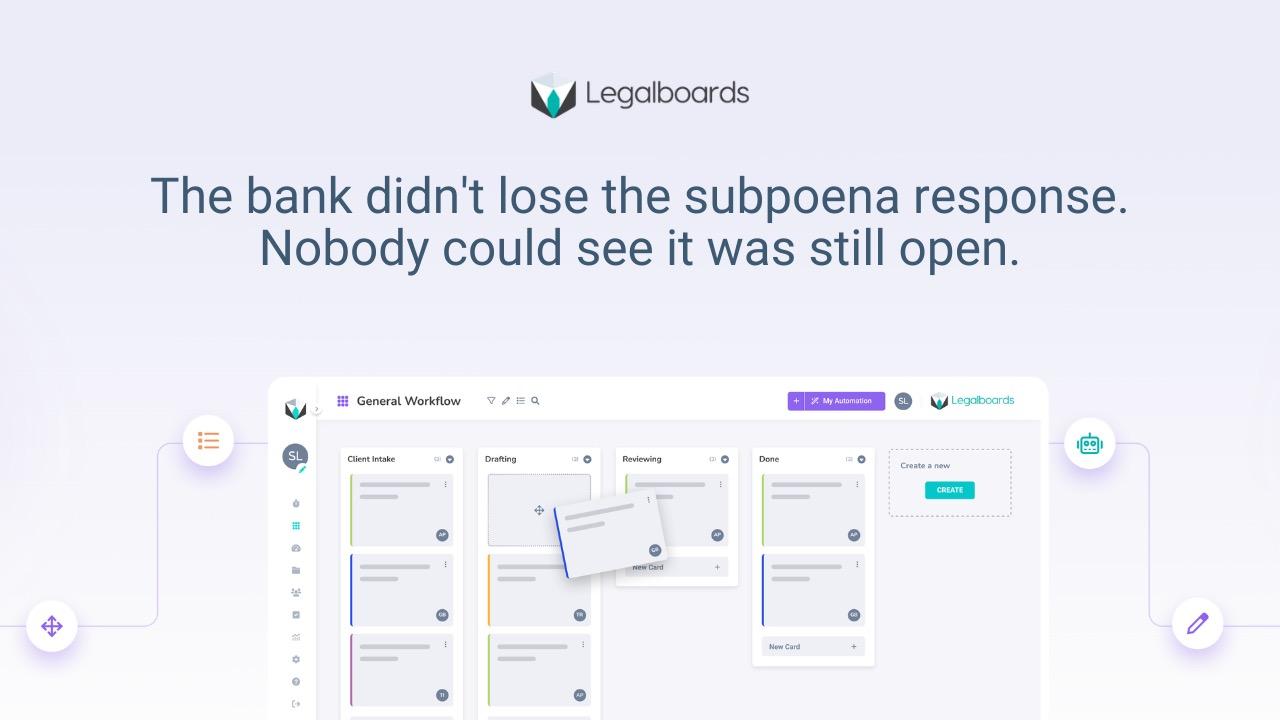
A growing trend in legal technology is adding project-management style visuals on top of case data. Tools such as Kanban boards allow teams to map case tasks as cards that move through clear stages, such as To Do, In Progress, and Done. This creates a bird’s-eye view of every matter and provides real-time visibility into who is responsible for each task.
With shared calendars and visual boards, stalled work becomes easy to spot. Paralegals and office managers can quickly identify overloaded team members or cases that are no longer progressing. Overdue tasks stand out immediately, helping teams act before deadlines become urgent. Automated checklists and workflow tracking also ensure everyone works from the same information, reducing confusion and missed follow-ups.
For legal teams, visual workflows turn complexity into a structured process. A litigation-friendly board might include stages such as New or Triage, Waiting on Client, Waiting on Opposing Party, Drafting, Attorney Review, Finalise, Ready to File, and Done. This structure achieves one critical outcome: it clearly separates active work from blocked work. In litigation, identifying blockers early is often the difference between calm progress and last-minute crisis.
Automation of Repetitive Tasks:
Legal workflow automation is one of the most effective ways to reduce paralegal busywork. Many small administrative tasks consume valuable time each day. These include sending deadline reminders, updating clients on case progress, generating routine documents, and entering the same information across multiple systems. Modern case and project management platforms can automate much of this work.
For example, when a matter is marked “Closed,” the system can automatically send a client thank-you email and archive related tasks. If a court date is approaching, automated rules can create a drafting task and assign it to the appropriate team member. These automated triggers remove the need to manually track every step.
Automation reduces mental load and helps prevent important actions from being missed. It also cuts non-billable administrative time significantly. Some firms report saving up to 30 non-billable hours per month through automated task workflows. Just as importantly, automation creates consistency. Every client receives timely communication, and every task follows the same structured process, without relying on memory during busy periods.
In litigation, the automations that tend to matter most aren’t flashy, they’re follow-ups and close-out steps. For example:
- When a task moves to Waiting on Opposing, auto-create follow-ups at 7/14/21 days.
- When a card moves to Ready to File, auto-create “save filing confirmation to the matter record” and “create next tickler.”
- When a discovery deadline is calendared, auto-generate a checklist (client docs request → privilege pass → draft → review → serve).
This is how you stop follow-ups depending on memory.
Empower Paralegals with Ownership of Process:
An often overlooked way to improve legal workflows is involving paralegals and support staff in shaping the process itself. Because they work closest to daily systems, they often spot bottlenecks before anyone else. Informal workarounds, such as shared spreadsheets or personal Outlook calendars, usually indicate that existing software features have not been properly configured or fully adopted.
Encouraging open discussion about what works and what does not helps teams identify practical improvements quickly. If poor visibility is causing last-minute deadline scrambles, introducing dashboard reporting or short weekly workflow reviews can make an immediate difference.
When paralegals have a voice in selecting and configuring tools, adoption improves across the firm. Systems begin to solve real operational problems rather than feeling like management-driven changes. As visibility increases, attorneys spend less time chasing updates, and teams naturally move toward more structured, proactive working practices.
A simple but effective habit is a weekly 15-minute “board scan” with attorneys. Review overdue tasks, blocked work, and upcoming deadlines for the next two weeks. This is not another long meeting; it is a quick visibility check that prevents surprises and keeps matters moving forward.
Your Questions, Answered
What is the difference between case management and project management in a law firm?
Case management refers to the software and systems that centralize all case information (contacts, documents, deadlines, etc.) in one place. Project management is about planning and tracking the work needed to move a case forward (tasks, phases, timelines).
Case management tools are tailored for legal needs (pre-configured for attorneys), whereas project management tools are generic and often require customization for legal use . In practice, small firms use case management software as the information hub, while applying project management techniques (like task lists or Kanban boards) to execute and monitor progress on each matter.
Can we use a general project management tool instead of legal case management software?
You can, but be prepared for extra work to make it fit. General project management apps (e.g. Asana, Trello) lack legal-specific features out-of-the-box. A Reddit user pointed out that “case management [tools have] been pre-configured to work with what attorneys need”, things like client/matter records, court deadline calculators, and billing integration.
With a generic tool, you’d have to manually set up custom fields and workflows for intakes, court dates, etc. . Many small firms find a hybrid approach best: use an affordable case management platform for the basics, and integrate or configure a project management tool for additional task-tracking visuals or automation.
How does legal workflow automation help reduce non-billable work?
Automation in legal workflows means using your software to perform routine actions automatically so staff don’t have to. This can dramatically cut down on non-billable administrative time. For example, a good system can auto-send client updates or deadline reminders once you input a date, rather than a paralegal drafting emails each time. It can also automatically generate task checklists for common case types, ensuring teams overlook nothing. Firms have reported saving dozens of hours per month by automating repetitive tasks and data entry . By letting technology handle the busywork; updating calendars, creating form documents, logging time, your team can focus more on billable work and substantive case strategy.
How can better workflow tools help prevent paralegal burnout?
One major cause of paralegal burnout is the feeling of constantly racing against deadlines and drowning in manual tasks. Better workflow tools directly address this by bringing order and predictability to the work. When a single system tracks every case deadline and task with reminders, paralegals gain confidence that nothing has been missed. Collaboration tools that give real-time updates mean paralegals spend less time chasing information and more time on meaningful work. Importantly, automating tedious tasks (like data entry or scheduling) lightens the load and reduces overtime. As processes improve, paralegals gain more control over their day and can establish a healthier work-life balance. Instead of operating in “sheer panic” mode, they can work proactively and feel on top of their responsibilities. Over time, this lowers stress levels and helps prevent burnout.
Do small firms really need case management software?
Even a 10–50 person firm will see big benefits from a case management system. When you’re small, people wear multiple hats, it’s easy to let details slip. Case management software acts as a safety net by tracking all the moving parts of your cases in one place. You might be getting by with spreadsheets or email threads now, but those methods tend to break down as your caseload grows (and especially if someone is out of the office). A proper system automatically tracks deadlines with reminders, organises and version-controls documents, and allows everyone to see a matter’s status without digging through emails. In short, it dramatically reduces the risk of errors and missed deadlines, which can save your firm from costly mistakes. Plus, many modern cloud-based solutions are affordable and scalable for small practices. They give you the tools to be efficient and professional, leveling the playing field with bigger firms, all without hiring extra staff.
By embracing the best of both case management and project management, small law firms can transform a chaotic workflow into a well-oiled machine. The key is to stay human and practical in the approach: involve your team, empathize with the pain points (burnout is real), and choose tools that genuinely make things easier rather than more complicated. Paralegals are the backbone of a firm’s operations, and giving them smarter workflows is not just about efficiency, it’s about making the work sustainable and even enjoyable again. With clear visibility, sensible automation, and a single source of truth, those stressful all-nighters and panicked email searches can become a thing of the past. Here’s to fewer fires to extinguish, and more time and headspace to focus on what really matters: serving clients and winning cases.